Studygram / Notebook Kawaii
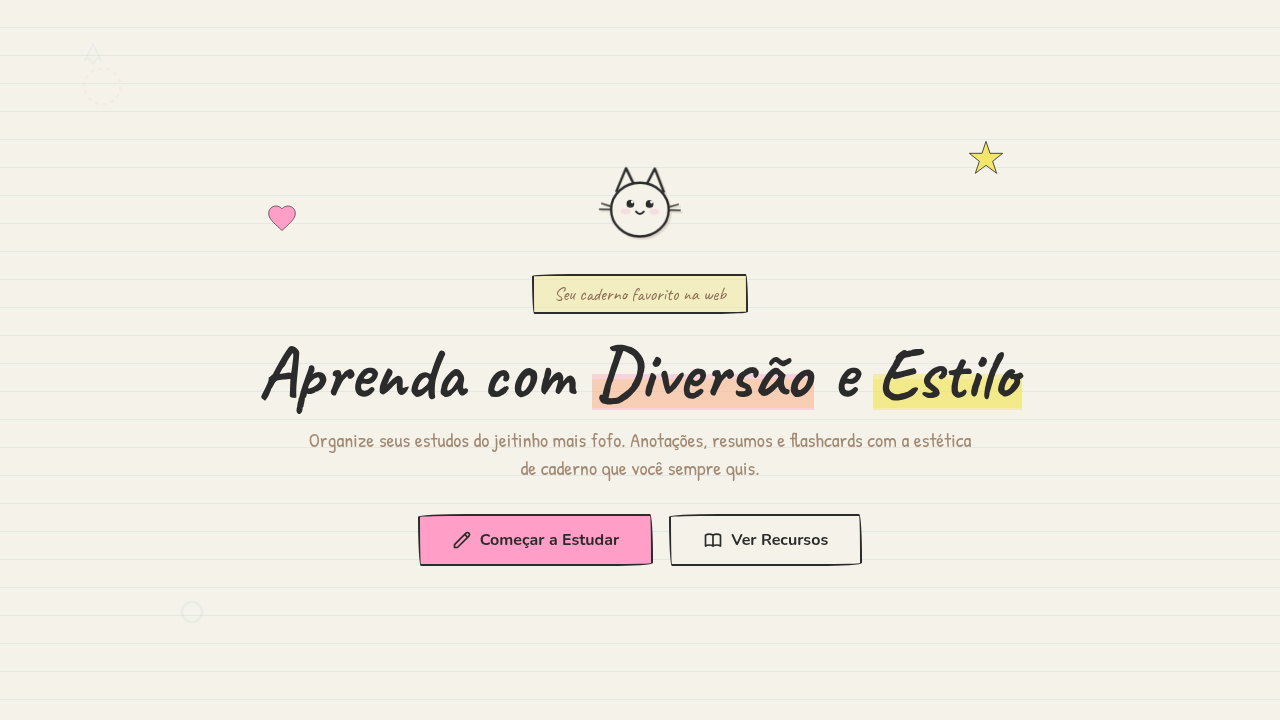
Studygram notebook kawaii interface. Ideal for landing pages, saas. AI-ready template.
Use case: Landing pages, SaaS
Historical Context
Somewhere around 2016, Instagram exploded with #studygram — students posting perfectly arranged desks, color-coded notes, and hand-lettered headers. It wasn't just aesthetic flexing. It was a whole productivity subculture built on the idea that making your notes beautiful made you actually want to study. Bullet journaling fed the same beast. Ryder Carroll's system got co-opted by artists who turned task lists into illustrated spreads with washi tape borders and tiny doodle icons. The leap to UI was inevitable. Education startups noticed that Gen Z associated learning with this handmade, sticker-covered notebook vibe — not with sterile LMS interfaces. Apps like Notion (with its emoji-heavy pages), Forest, and dozens of Korean study timer apps started borrowing the visual language: ruled-paper backgrounds, hand-drawn checkboxes, kawaii mascots cheering you on. The notebook stopped being a metaphor and became an interface pattern. What makes it stick is the warmth. Digital tools feel cold. Notebook aesthetics smuggle in the tactile comfort of paper, the personality of someone's actual handwriting. It's skeuomorphism reborn — not as fake leather textures, but as illustrated stickers and wobbly grid lines that say: this space is yours to mess up.
When to Use
Reach for this style when your users are students, journalers, or anyone who associates productivity with creative expression. It works beautifully for study planners, flashcard apps, habit trackers, and educational platforms targeting teens through twentysomethings. Also strong for onboarding flows where you need to reduce intimidation — the hand-drawn quality signals low-pressure, playful, forgiving. Avoid it for anything requiring perceived authority or precision. A tax app in notebook kawaii is unhinged.
Design Principles
- Imperfection is the point — wobbly lines, slightly off-grid elements, and hand-drawn textures create warmth that pixel-perfect layouts cannot
- Layer like a real notebook — stickers overlap borders, doodles break margins, tape holds things 'in place' — depth comes from collage logic, not drop shadows
- Kawaii characters earn their space — mascots and illustrated elements must serve a UX function (feedback, wayfinding, emotional reward), never just decoration
- Constrain the palette to 4-5 highlighter colors — the aesthetic dies when you add too many hues; think Mildliner set, not rainbow explosion
- Respect the grid underneath the chaos — the notebook style looks effortless but needs rigid underlying structure to remain usable at scale
DESIGN.md
---
version: "alpha"
name: "Studygram / Notebook Kawaii"
description: "Studygram notebook kawaii interface. Ideal for landing pages, saas. AI-ready template."
colors:
  primary: "#F4F2E9"
  secondary: "#2B2B2B"
  tertiary: "#6FA3D2"
  neutral: "#FF9EC6"
  surface: "#F2E66B"
  accent: "#8D6E54"
typography:
  h1:
    fontFamily: hand-written style
    fontSize: 2.25rem
    fontWeight: 700
  body-md:
    fontFamily: hand-written style
    fontSize: 1rem
    fontWeight: 400
  label-caps:
    fontFamily: hand-written style
    fontSize: 0.75rem
    fontWeight: 500
components:
  button-primary:
    backgroundColor: "{colors.primary}"
    textColor: "{colors.neutral}"
    padding: 12px
---

## Overview

Studygram notebook kawaii interface. Ideal for landing pages, saas. AI-ready template. Somewhere around 2016, Instagram exploded with #studygram — students posting perfectly arranged desks, color-coded notes, and hand-lettered headers. It wasn't just aesthetic flexing. It was a whole productivity subculture built on the idea that making your notes beautiful made you actually want to study. Bullet journaling fed the same beast. Ryder Carroll's system got co-opted by artists who turned task lists into illustrated spreads with washi tape borders and tiny doodle icons.

The leap to UI was inevitable. Education startups noticed that Gen Z associated learning with this handmade, sticker-covered notebook vibe — not with sterile LMS interfaces. Apps like Notion (with its emoji-heavy pages), Forest, and dozens of Korean study timer apps started borrowing the visual language: ruled-paper backgrounds, hand-drawn checkboxes, kawaii mascots cheering you on. The notebook stopped being a metaphor and became an interface pattern.

What makes it stick is the warmth. Digital tools feel cold. Notebook aesthetics smuggle in the tactile comfort of paper, the personality of someone's actual handwriting. It's skeuomorphism reborn — not as fake leather textures, but as illustrated stickers and wobbly grid lines that say: this space is yours to mess up.

- Density: 5/10 — Balanced
- Variance: 8/10 — Expressive
- Motion: 6/10 — Expressive

- **Style:** Cute, Organized, Pastel, Educational
- **Keywords:** Hand-drawn illustrations, doodles, notebook aesthetic, character mascots, felt-tip pen, highlighter markers, journaling, personal, educational
- **Era:** Studygram Culture
- **Light/Dark:** ✓ Full / ◐ Partial

## Colors

- **Warm Paper** (#F4F2E9) — Primary surface or dominant color
- **Dark Text** (#2B2B2B) — Dark surface, primary background
- **Soft Blue** (#6FA3D2) — Accent highlight, links and focus states
- **Pink Highlight** (#FF9EC6) — Primary text color
- **Yellow Highlight** (#F2E66B) — Warning states, attention indicators
- **Brown Ink** (#8D6E54) — Primary text color
- **Cool Grey** (#A8A8A8) — Secondary text, borders, muted elements


## Typography

- **Display / Hero:** hand-written style — Weight 700, tight tracking, used for headline impact
- **Body:** hand-written style — Weight 400, 16px/1.6 line-height, max 72ch per line
- **UI Labels / Captions:** hand-written style — 0.875rem, weight 500, slight letter-spacing
- **Monospace:** JetBrains Mono — Used for code, metadata, and technical values

Scale:
- Hero: clamp(2.5rem, 5vw, 4rem)
- H1: 2.25rem
- H2: 1.5rem
- Body: 1rem / 1.6
- Small: 0.875rem


## Layout

- **Grid:** CSS Grid primary. Max-width containment: 1280px centered with 1.5rem side padding.
- **Spacing rhythm:** Balanced. Base unit: 0.5rem (8px).
- **Section vertical gaps:** clamp(4rem, 8vw, 8rem).
- **Hero layout:** Asymmetric composition.
- **Feature sections:** Asymmetric grid with varied card sizes. No 3-equal-columns.
- **Mobile collapse:** All multi-column layouts collapse below 768px. No horizontal overflow.
- **z-index contract:** base (0) / sticky-nav (100) / overlay (200) / modal (300) / toast (500).


## Elevation & Depth

Flat ambient scanning light, hand-drawn wobble animations, doodle reveal on scroll, highlighter swipe effect, sticker pop-in animations

- **Physics:** Spring — stiffness 120, damping 20. Confident, weighted transitions.
- **Entry animations:** Fade + translate-Y (16px → 0) over 480ms ease-out. Staggered cascades for lists: 100ms between items.
- **Hover states:** Scale(1.03) + shadow lift over 200ms.
- **Page transitions:** Fade + slide (300ms).
- **Performance:** Only transform and opacity animated. No layout-triggering properties.


## Shapes

Base corner radius: 12px. See rounded tokens in front matter for the full scale.


## Components

- **Primary Button:** Moderately rounded (0.75rem) shape. Accent color fill. Hover: 8% darken + subtle lift shadow. Active: -1px translate tactile press. Font weight 600. No outer glows.
- **Secondary / Ghost Button:** Outline variant. 1.5px border in muted color. Text in primary color. Hover: subtle background fill.
- **Cards:** Moderately rounded (0.75rem) corners. Surface background. Subtle shadow (0 2px 12px rgba(0,0,0,0.06)). 1px border stroke.
- **Inputs:** Label above input. 1px border stroke. Focus ring: 2px accent color offset 2px. Error text below in semantic red. No floating labels.
- **Navigation:** Primary surface background. Active item: accent color indicator. Font weight 500 when active.
- **Skeletons:** Shimmer animation matching component dimensions. No circular spinners.
- **Empty States:** Icon-based composition with descriptive text and action button.


## Do's and Don'ts

- No emojis in UI — use icon system only (Lucide, Heroicons)
- No pure black (#000000) — use off-black or charcoal variants
- No oversaturated accent colors (saturation cap: 80%)
- No 3-column equal-width feature layouts — use zig-zag or asymmetric grid
- No `h-screen` — use `min-h-[100dvh]`
- No AI copywriting clichés: "Elevate", "Seamless", "Unleash", "Next-Gen"
- No broken external image links — use picsum.photos or inline SVG
- No generic lorem ipsum in demos

- Do Notebook paper background
- Do Hand-drawn elements
- Do Doodle decorations
- Do Highlighter effects
- Do Journaling aesthetic
- Do Cute mascot present


## Use Case

Landing pages, SaaS
Technical Specs
CSS
background: #F4F2E9 with ruled lines, color: #2B2B2B, font-family: hand-written style, border: hand-drawn SVG, highlight: linear-gradient yellow/pink, doodle SVG decorations, marker transparency effect
Variables
--paper-bg: #F4F2E9, --ink-dark: #2B2B2B, --soft-blue: #6FA3D2, --pink-highlight: #FF9EC6, --yellow-highlight: #F2E66B, --line-spacing: 28px
Checklist
☐ Notebook paper background, ☐ Hand-drawn elements, ☐ Doodle decorations, ☐ Highlighter effects, ☐ Journaling aesthetic, ☐ Cute mascot present
Colors
Primary
Secondary
Effects
Flat ambient scanning light, hand-drawn wobble animations, doodle reveal on scroll, highlighter swipe effect, sticker pop-in animations
Light/Dark
✓ Full / ◐ Partial
AI Prompt
Act as a Senior Frontend Engineer and Expert UI Designer.
Your task is to code a complete Landing Page on the first attempt.
- Landing Page Theme: <INSERT THEME>
- Sections to add: <INSERT SECTIONS>

Generate the final code immediately following these definitions:

## Style

- **Name:** Studygram / Notebook Kawaii
- **Type:** Cute, Organized, Pastel, Educational
- **Keywords:** Hand-drawn illustrations, doodles, notebook aesthetic, character mascots, felt-tip pen, highlighter markers, journaling, personal, educational
- **Era:** Studygram Culture
- **Light/Dark:** ✓ Full / ◐ Partial

## Color Palette

- **Primary:** Warm Paper #F4F2E9, Dark Text #2B2B2B, Soft Blue #6FA3D2, Pink Highlight #FF9EC6
- **Secondary:** Yellow Highlight #F2E66B, Brown Ink #8D6E54, Cool Grey #A8A8A8, marker transparency

## Visual Effects

Flat ambient scanning light, hand-drawn wobble animations, doodle reveal on scroll, highlighter swipe effect, sticker pop-in animations

## AI Visual Direction

Design a studygram notebook kawaii interface. Use: notebook paper background (#F4F2E9), hand-drawn illustrations, doodle decorations (hearts, stars, sparkles), felt-tip pen ink style, highlighter marker effects, character mascots, journaling aesthetic.

## CSS Technical

```css
background: #F4F2E9 with ruled lines, color: #2B2B2B, font-family: hand-written style, border: hand-drawn SVG, highlight: linear-gradient yellow/pink, doodle SVG decorations, marker transparency effect
```

## Design System Variables

```css
--paper-bg: #F4F2E9, --ink-dark: #2B2B2B, --soft-blue: #6FA3D2, --pink-highlight: #FF9EC6, --yellow-highlight: #F2E66B, --line-spacing: 28px
```

## Implementation Checklist

- ☐ Notebook paper background
- ☐ Hand-drawn elements
- ☐ Doodle decorations
- ☐ Highlighter effects
- ☐ Journaling aesthetic
- ☐ Cute mascot present

## Execution Rules

1. Strictly follow the defined visual style.
2. Use high-quality inline SVG icons (Heroicons or Lucide style) — NEVER use emojis as icons.
3. Add `cursor-pointer` and smooth `hover` states (transition-all) on all interactive elements.
4. Required Page Structure:
   - Navbar (Logo + Links + CTA)
   - Hero Section (Impactful Headline + Subtitle + 2 buttons + 3D/Abstract visual element via CSS)
   - Features (3 cards with icons)
   - Testimonials (3 cards)
   - Pricing (3 tiers, highlight the middle one)
   - Final CTA
   - Full Footer with social links, privacy policy, terms of use, contact and SEO links.
5. All text content must be in English.
6. The visual must be CLEARLY distinct — do not create a "default Bootstrap" design. Force the use of the provided design system variables.
7. Use `<style>` tags in the head for custom classes (especially for complex backdrop-filter effects and animations) that Tailwind CDN doesn't cover.
8. Full Responsiveness: Layout must adapt perfectly to Mobile, Tablet and Desktop (vertical stack on mobile).
9. Include basic SEO, Viewport and Open Graph meta tags in `<head>`.
10. Footer must contain: Copyright 2026, Secondary navigation links and Social media icons.
11. Make the creative decisions needed to deliver the complete, functional result now.
Related
Last synced: 4/1/2026