Spatial UI (VisionOS)
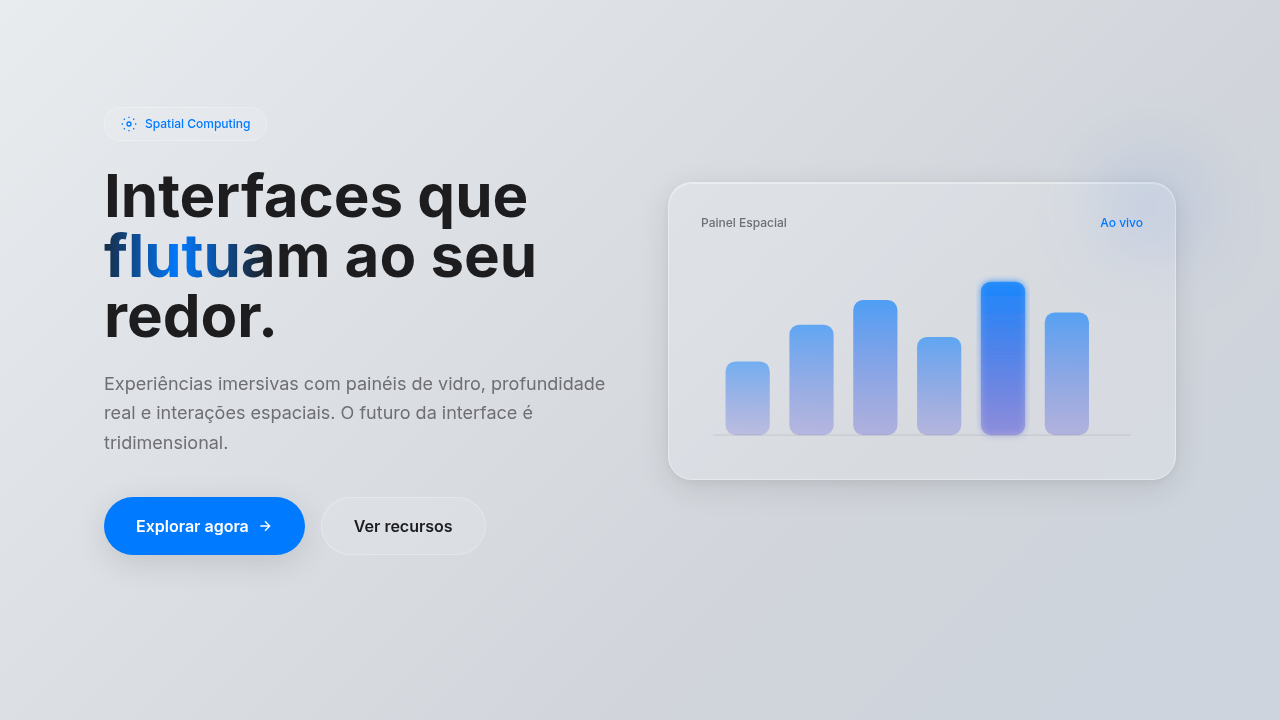
VisionOS-style spatial interface. Ideal for landing pages, saas. AI-ready template.
Use case: Landing pages, SaaS
Historical Context
When Apple dropped Vision Pro in early 2024, spatial UI stopped being a concept deck and became a shipping platform. Overnight, designers had to reckon with a new canvas — one where windows float, backgrounds don't exist, and depth is literal, not metaphorical. visionOS broke from iOS in ways that matter. Gone is the opaque surface. In its place: glass. A dynamic, light-responsive material that refracts the user's actual environment. Elements don't sit on a screen — they hover in a room. The design guidelines read less like a style guide and more like a physics lesson. Z-axis spacing, eye-tracking hit targets, ergonomic gaze angles. It's a different discipline. For 2D designers, the shift is uncomfortable and exciting in equal measure. Your Figma muscle memory still applies — hierarchy, typography, contrast — but the mental model is architectural now. You're placing objects in space, not pixels on a plane. The glass material system forces restraint: if everything is translucent, nothing can scream. Subtlety becomes structural.
When to Use
Reach for spatial UI when you're designing for headsets, mixed reality experiences, or any context where the interface shares space with the physical world. It's the right call for Apple Vision Pro apps, AR overlays that need to feel native rather than bolted-on, and immersive environments where flat panels would feel like a regression. Also useful as a design language for forward-looking brand work — tech companies signaling where they're headed. Skip it for traditional screens. Glass without depth is just frosted blur.
Design Principles
- Depth is information — use z-axis positioning to communicate hierarchy, not decoration
- Glass is earned — translucent materials only work when the content behind them adds context, never use glass to hide emptiness
- Respect the room — spatial UI coexists with physical space, designs must feel placed, not projected
- Eyes are the cursor — size, spacing, and interactive zones must account for gaze precision, not finger precision
- Restraint over spectacle — immersion comes from coherence, not from throwing every 3D trick at the user simultaneously
DESIGN.md
---
version: "alpha"
name: "Spatial UI (VisionOS)"
description: "VisionOS-style spatial interface. Ideal for landing pages, saas. AI-ready template."
colors:
  primary: "#FFFFFF"
typography:
  h1:
    fontFamily: System UI stack
    fontSize: 2.25rem
    fontWeight: 700
  body-md:
    fontFamily: System UI stack
    fontSize: 1rem
    fontWeight: 400
  label-caps:
    fontFamily: System UI stack
    fontSize: 0.75rem
    fontWeight: 500
rounded:
  sm: 24px
  md: 48px
  lg: 72px
components:
  button-primary:
    backgroundColor: "{colors.primary}"
    rounded: "{rounded.sm}"
    padding: 12px
---

## Overview

VisionOS-style spatial interface. Ideal for landing pages, saas. AI-ready template. When Apple dropped Vision Pro in early 2024, spatial UI stopped being a concept deck and became a shipping platform. Overnight, designers had to reckon with a new canvas — one where windows float, backgrounds don't exist, and depth is literal, not metaphorical.

visionOS broke from iOS in ways that matter. Gone is the opaque surface. In its place: glass. A dynamic, light-responsive material that refracts the user's actual environment. Elements don't sit on a screen — they hover in a room. The design guidelines read less like a style guide and more like a physics lesson. Z-axis spacing, eye-tracking hit targets, ergonomic gaze angles. It's a different discipline.

For 2D designers, the shift is uncomfortable and exciting in equal measure. Your Figma muscle memory still applies — hierarchy, typography, contrast — but the mental model is architectural now. You're placing objects in space, not pixels on a plane. The glass material system forces restraint: if everything is translucent, nothing can scream. Subtlety becomes structural.

- Density: 5/10 — Balanced
- Variance: 4/10 — Moderate
- Motion: 8/10 — Cinematic

- **Style:** Spatial, Translucent, Immersive, Futuristic
- **Keywords:** Glass, depth, immersion, spatial, translucent, gaze, gesture, apple, vision-pro
- **Era:** 2024 Spatial Era
- **Light/Dark:** ✓ Full / ✓ Full

## Colors

- **Frosted Glass** (#FFFFFF) — Primary surface or dominant color


## Typography

- **Display / Hero:** System UI stack (-apple-system, sans-serif) — Weight 700, tight tracking, used for headline impact
- **Body:** System UI stack (-apple-system, sans-serif) — Weight 400, 16px/1.6 line-height, max 72ch per line
- **UI Labels / Captions:** System UI stack (-apple-system, sans-serif) — 0.875rem, weight 500, slight letter-spacing
- **Monospace:** JetBrains Mono — Used for code, metadata, and technical values

Scale:
- Hero: clamp(2.5rem, 5vw, 4rem)
- H1: 2.25rem
- H2: 1.5rem
- Body: 1rem / 1.6
- Small: 0.875rem


## Layout

- **Grid:** CSS Grid primary. Max-width containment: 1280px centered with 1.5rem side padding.
- **Spacing rhythm:** Balanced. Base unit: 0.5rem (8px).
- **Section vertical gaps:** clamp(4rem, 8vw, 8rem).
- **Hero layout:** Split-screen (text left, visual right).
- **Feature sections:** Zig-zag alternating text+image rows. No 3-equal-columns.
- **Mobile collapse:** All multi-column layouts collapse below 768px. No horizontal overflow.
- **z-index contract:** base (0) / sticky-nav (100) / overlay (200) / modal (300) / toast (500).


## Elevation & Depth

Parallax depth, dynamic lighting response, gaze-hover effects, smooth scale on focus

- **Physics:** Spring — stiffness 120, damping 20. Confident, weighted transitions.
- **Entry animations:** Fade + translate-Y (16px → 0) over 540ms ease-out. Staggered cascades for lists: 120ms between items.
- **Hover states:** Scale(1.03) + shadow lift over 200ms.
- **Page transitions:** Fade + slide (300ms).
- **Performance:** Only transform and opacity animated. No layout-triggering properties.


## Shapes

Base corner radius: 24px. See rounded tokens in front matter for the full scale.


## Components

- **Primary Button:** Generously rounded (1.5rem) shape. Accent color fill. Hover: 8% darken + subtle lift shadow. Active: -1px translate tactile press. Font weight 600. No outer glows.
- **Secondary / Ghost Button:** Outline variant. 1.5px border in muted color. Text in primary color. Hover: subtle background fill.
- **Cards:** Generously rounded (1.5rem) corners. Surface background. Subtle shadow (0 2px 12px rgba(0,0,0,0.06)). 1px border stroke.
- **Inputs:** Label above input. 1px border stroke. Focus ring: 2px accent color offset 2px. Error text below in semantic red. No floating labels.
- **Navigation:** Primary surface background. Active item: accent color indicator. Font weight 500 when active.
- **Skeletons:** Shimmer animation matching component dimensions. No circular spinners.
- **Empty States:** Icon-based composition with descriptive text and action button.


## Do's and Don'ts

- No emojis in UI — use icon system only (Lucide, Heroicons)
- No pure black (#000000) — use off-black or charcoal variants
- No oversaturated accent colors (saturation cap: 80%)
- No 3-column equal-width feature layouts — use zig-zag or asymmetric grid
- No `h-screen` — use `min-h-[100dvh]`
- No AI copywriting clichés: "Elevate", "Seamless", "Unleash", "Next-Gen"
- No broken external image links — use picsum.photos or inline SVG
- No generic lorem ipsum in demos

- Do Glass effect visible
- Do Depth layers clear
- Do Hover states defined
- Do Colors vibrant on active
- Do Floating feel achieved
- Do Contrast maintained


## Use Case

Landing pages, SaaS
Technical Specs
CSS
backdrop-filter: blur(40px) saturate(180%), background: rgba(255,255,255,0.2), border-radius: 24px, box-shadow: 0 8px 32px rgba(0,0,0,0.1), transform: scale on focus, depth via shadows
Variables
--glass-bg: rgba(255,255,255,0.2), --glass-blur: 40px, --glass-saturate: 180%, --window-radius: 24px, --depth-shadow: 0 8px 32px rgba(0,0,0,0.1), --focus-scale: 1.02
Checklist
☐ Glass effect visible, ☐ Depth layers clear, ☐ Hover states defined, ☐ Colors vibrant on active, ☐ Floating feel achieved, ☐ Contrast maintained
Colors
Primary
Effects
Parallax depth, dynamic lighting response, gaze-hover effects, smooth scale on focus
Light/Dark
✓ Full / ✓ Full
AI Prompt
Act as a Senior Frontend Engineer and Expert UI Designer.
Your task is to code a complete Landing Page on the first attempt.
- Landing Page Theme: <INSERT THEME>
- Sections to add: <INSERT SECTIONS>

Generate the final code immediately following these definitions:

## Style

- **Name:** Spatial UI (VisionOS)
- **Type:** Spatial, Translucent, Immersive, Futuristic
- **Keywords:** Glass, depth, immersion, spatial, translucent, gaze, gesture, apple, vision-pro
- **Era:** 2024 Spatial Era
- **Light/Dark:** ✓ Full / ✓ Full

## Color Palette

- **Primary:** Frosted Glass #FFFFFF (15-30% opacity), System White
- **Secondary:** Vibrant system colors for active states, deep shadows for depth

## Visual Effects

Parallax depth, dynamic lighting response, gaze-hover effects, smooth scale on focus

## AI Visual Direction

Design a VisionOS-style spatial interface. Use: frosted glass panels, depth layers, translucent backgrounds (15-30% opacity), vibrant colors for active states, gaze-hover effects, floating windows, immersive feel.

## CSS Technical

```css
backdrop-filter: blur(40px) saturate(180%), background: rgba(255,255,255,0.2), border-radius: 24px, box-shadow: 0 8px 32px rgba(0,0,0,0.1), transform: scale on focus, depth via shadows
```

## Design System Variables

```css
--glass-bg: rgba(255,255,255,0.2), --glass-blur: 40px, --glass-saturate: 180%, --window-radius: 24px, --depth-shadow: 0 8px 32px rgba(0,0,0,0.1), --focus-scale: 1.02
```

## Implementation Checklist

- ☐ Glass effect visible
- ☐ Depth layers clear
- ☐ Hover states defined
- ☐ Colors vibrant on active
- ☐ Floating feel achieved
- ☐ Contrast maintained

## Execution Rules

1. Strictly follow the defined visual style.
2. Use high-quality inline SVG icons (Heroicons or Lucide style) — NEVER use emojis as icons.
3. Add `cursor-pointer` and smooth `hover` states (transition-all) on all interactive elements.
4. Required Page Structure:
   - Navbar (Logo + Links + CTA)
   - Hero Section (Impactful Headline + Subtitle + 2 buttons + 3D/Abstract visual element via CSS)
   - Features (3 cards with icons)
   - Testimonials (3 cards)
   - Pricing (3 tiers, highlight the middle one)
   - Final CTA
   - Full Footer with social links, privacy policy, terms of use, contact and SEO links.
5. All text content must be in English.
6. The visual must be CLEARLY distinct — do not create a "default Bootstrap" design. Force the use of the provided design system variables.
7. Use `<style>` tags in the head for custom classes (especially for complex backdrop-filter effects and animations) that Tailwind CDN doesn't cover.
8. Full Responsiveness: Layout must adapt perfectly to Mobile, Tablet and Desktop (vertical stack on mobile).
9. Include basic SEO, Viewport and Open Graph meta tags in `<head>`.
10. Footer must contain: Copyright 2026, Secondary navigation links and Social media icons.
11. Make the creative decisions needed to deliver the complete, functional result now.
Related
Last synced: 4/1/2026