Gen Z Chaos / Maximalism
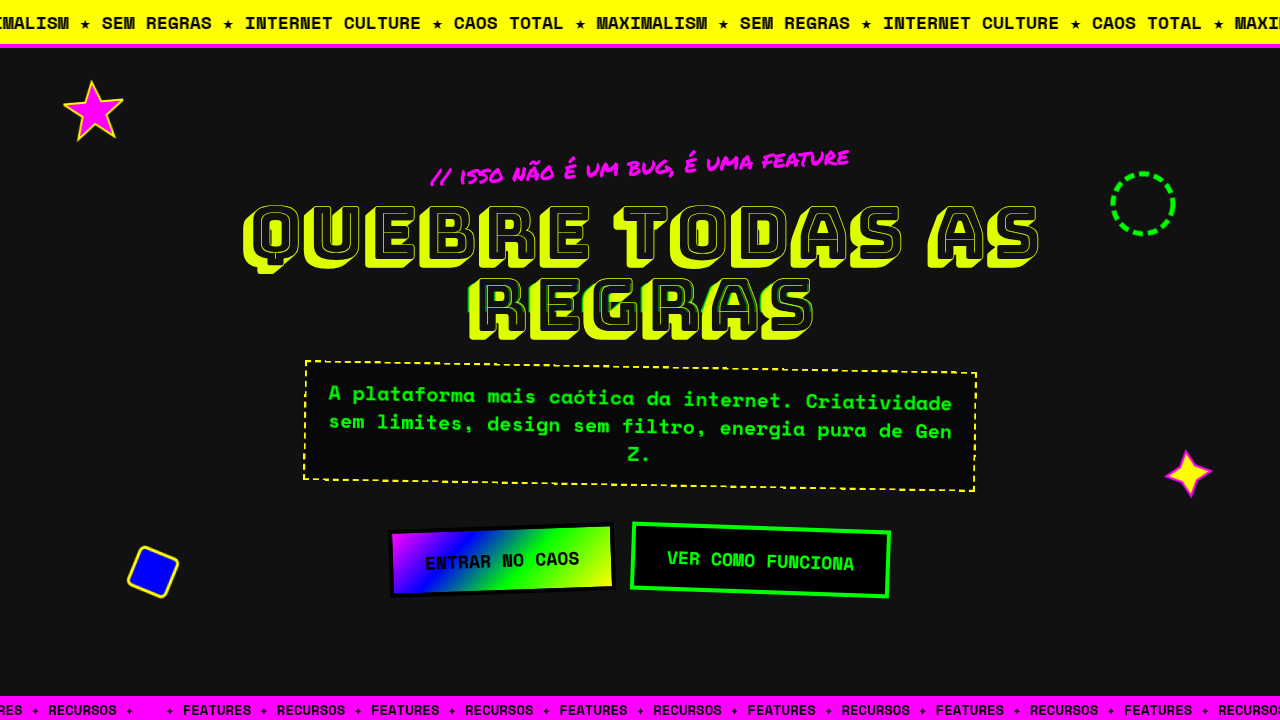
Gen Z chaos maximalist interface. Ideal for landing pages, saas. AI-ready template.
Use case: Landing pages, SaaS
Historical Context
Millennials gave us the white space gospel. Clean grids, sans-serif everything, that particular shade of startup blue. Gen Z looked at all of it and said: absolutely not. The backlash started on TikTok and BeReal — raw, unfiltered, deliberately messy. Screenshots layered on screenshots. Stickers slapped over stickers. The aesthetic wasn't accidental; it was a middle finger to the polished, venture-backed sameness that dominated the 2010s. 'Ugly' became a design choice, not a failure. Cluttercore wasn't just for bedrooms — it hit the screen. This is anti-corporate design as identity politics. When every brand looks like every other brand (thanks, Figma templates), visual chaos becomes rebellion. The references pull from early-2000s web, MySpace customization, zine culture, and meme formats. It's maximalism with a purpose: if your design looks too clean, you're probably lying about something. Gen Z trusts the mess because the mess feels human.
When to Use
When your audience is under 25 and allergic to anything that smells like a boardroom. Youth brands, social-first apps, streetwear drops, meme pages, creator tools — anywhere authenticity matters more than polish. Works brilliantly for limited drops, event marketing, and anything competing for attention in a feed. Skip this if you need enterprise trust signals or if your users are over 40. The chaos has to feel native, not cosplayed.
Design Principles
- More is more — layer stickers, textures, type, and imagery until it feels alive, then add one more thing
- Kill the grid on purpose — asymmetry, overlapping elements, and intentional 'broken' layouts signal authenticity
- Steal from the feed — meme formats, screenshot aesthetics, chat bubbles, and notification UI as decorative elements
- Anti-polish everything — pixel fonts, compression artifacts, hand-drawn marks, and visible tool traces over rendered perfection
- Velocity over refinement — design should feel fast, reactive, and disposable, like a story that expires in 24 hours
DESIGN.md
---
version: "alpha"
name: "Gen Z Chaos / Maximalism"
description: "Gen Z chaos maximalist interface. Ideal for landing pages, saas. AI-ready template."
colors:
  primary: "#FF00FF"
  secondary: "#00FF00"
  tertiary: "#FFFF00"
  neutral: "#0000FF"
typography:
  h1:
    fontFamily: System UI stack
    fontSize: 2.25rem
    fontWeight: 700
  body-md:
    fontFamily: System UI stack
    fontSize: 1rem
    fontWeight: 400
  label-caps:
    fontFamily: System UI stack
    fontSize: 0.75rem
    fontWeight: 500
components:
  button-primary:
    backgroundColor: "{colors.primary}"
    textColor: "{colors.neutral}"
    padding: 12px
---

## Overview

Gen Z chaos maximalist interface. Ideal for landing pages, saas. AI-ready template. Millennials gave us the white space gospel. Clean grids, sans-serif everything, that particular shade of startup blue. Gen Z looked at all of it and said: absolutely not.

The backlash started on TikTok and BeReal — raw, unfiltered, deliberately messy. Screenshots layered on screenshots. Stickers slapped over stickers. The aesthetic wasn't accidental; it was a middle finger to the polished, venture-backed sameness that dominated the 2010s. 'Ugly' became a design choice, not a failure. Cluttercore wasn't just for bedrooms — it hit the screen.

This is anti-corporate design as identity politics. When every brand looks like every other brand (thanks, Figma templates), visual chaos becomes rebellion. The references pull from early-2000s web, MySpace customization, zine culture, and meme formats. It's maximalism with a purpose: if your design looks too clean, you're probably lying about something. Gen Z trusts the mess because the mess feels human.

- Density: 5/10 — Balanced
- Variance: 8/10 — Expressive
- Motion: 4/10 — Subtle

- **Style:** Chaotic, Maximalist, Colorful, Expressive
- **Keywords:** Chaos, clutter, stickers, raw, collage, mixed media, loud, internet culture, ironic
- **Era:** 2023+ Internet Core
- **Light/Dark:** ✓ Full / ✓ Full

## Colors

- **#FF00FF** (#FF00FF) — Primary surface or dominant color
- **#00FF00** (#00FF00) — Secondary surface or text color
- **#FFFF00** (#FFFF00) — Supporting palette color
- **#0000FF** (#0000FF) — Supporting palette color


## Typography

- **Display / Hero:** System UI stack (-apple-system, sans-serif) — Weight 700, tight tracking, used for headline impact
- **Body:** System UI stack (-apple-system, sans-serif) — Weight 400, 16px/1.6 line-height, max 72ch per line
- **UI Labels / Captions:** System UI stack (-apple-system, sans-serif) — 0.875rem, weight 500, slight letter-spacing
- **Monospace:** JetBrains Mono — Used for code, metadata, and technical values

Scale:
- Hero: clamp(2.5rem, 5vw, 4rem)
- H1: 2.25rem
- H2: 1.5rem
- Body: 1rem / 1.6
- Small: 0.875rem


## Layout

- **Grid:** CSS Grid primary. Max-width containment: 1280px centered with 1.5rem side padding.
- **Spacing rhythm:** Balanced. Base unit: 0.5rem (8px).
- **Section vertical gaps:** clamp(4rem, 8vw, 8rem).
- **Hero layout:** Asymmetric composition.
- **Feature sections:** Asymmetric grid with varied card sizes. No 3-equal-columns.
- **Mobile collapse:** All multi-column layouts collapse below 768px. No horizontal overflow.
- **z-index contract:** base (0) / sticky-nav (100) / overlay (200) / modal (300) / toast (500).


## Elevation & Depth

Marquee scrolls, jitter, sticker layering, GIF overload, random placement, drag-and-drop

- **Physics:** Ease-out curves, 200-300ms duration. Smooth and predictable.
- **Entry animations:** Fade + translate-Y (16px → 0) over 420ms ease-out. Staggered cascades for lists: 80ms between items.
- **Hover states:** Subtle color shift + shadow adjustment over 200ms.
- **Page transitions:** Fade only (200ms).
- **Performance:** Only transform and opacity animated. No layout-triggering properties.


## Shapes

Base corner radius: 8px. See rounded tokens in front matter for the full scale.


## Components

- **Primary Button:** Subtly rounded (0.5rem) shape. Accent color fill. Hover: 8% darken + subtle lift shadow. Active: -1px translate tactile press. Font weight 600. No outer glows.
- **Secondary / Ghost Button:** Outline variant. 1.5px border in muted color. Text in primary color. Hover: subtle background fill.
- **Cards:** Subtly rounded (0.5rem) corners. Surface background. Subtle shadow (0 2px 12px rgba(0,0,0,0.06)). 1px border stroke.
- **Inputs:** Label above input. 1px border stroke. Focus ring: 2px accent color offset 2px. Error text below in semantic red. No floating labels.
- **Navigation:** Primary surface background. Active item: accent color indicator. Font weight 500 when active.
- **Skeletons:** Shimmer animation matching component dimensions. No circular spinners.
- **Empty States:** Icon-based composition with descriptive text and action button.


## Do's and Don'ts

- No emojis in UI — use icon system only (Lucide, Heroicons)
- No pure black (#000000) — use off-black or charcoal variants
- No oversaturated accent colors (saturation cap: 80%)
- No 3-column equal-width feature layouts — use zig-zag or asymmetric grid
- No `h-screen` — use `min-h-[100dvh]`
- No AI copywriting clichés: "Elevate", "Seamless", "Unleash", "Next-Gen"
- No broken external image links — use picsum.photos or inline SVG
- No generic lorem ipsum in demos

- Do Colors clash intentionally
- Do Stickers/overlays present
- Do Layout chaotic but usable
- Do GIFs optimized
- Do Mobile scrollable
- Do Performance acceptable


## Use Case

Landing pages, SaaS
Technical Specs
CSS
mix-blend-mode: multiply/screen, transform: rotate(random), animation: jitter, marquee text, position: absolute for scattered elements, filter: saturate(150%), z-index chaos
Variables
--chaos-pink: #FF00FF, --chaos-green: #00FF00, --chaos-yellow: #FFFF00, --chaos-blue: #0000FF, --jitter-amount: 5deg, --saturate: 150%
Checklist
☐ Colors clash intentionally, ☐ Stickers/overlays present, ☐ Layout chaotic but usable, ☐ GIFs optimized, ☐ Mobile scrollable, ☐ Performance acceptable
Colors
Primary
Effects
Marquee scrolls, jitter, sticker layering, GIF overload, random placement, drag-and-drop
Light/Dark
✓ Full / ✓ Full
AI Prompt
Act as a Senior Frontend Engineer and Expert UI Designer.
Your task is to code a complete Landing Page on the first attempt.
- Landing Page Theme: <INSERT THEME>
- Sections to add: <INSERT SECTIONS>

Generate the final code immediately following these definitions:

## Style

- **Name:** Gen Z Chaos / Maximalism
- **Type:** Chaotic, Maximalist, Colorful, Expressive
- **Keywords:** Chaos, clutter, stickers, raw, collage, mixed media, loud, internet culture, ironic
- **Era:** 2023+ Internet Core
- **Light/Dark:** ✓ Full / ✓ Full

## Color Palette

- **Primary:** Clashing Brights: #FF00FF, #00FF00, #FFFF00, #0000FF
- **Secondary:** Gradients, rainbow, glitch, noise, heavily saturated mix

## Visual Effects

Marquee scrolls, jitter, sticker layering, GIF overload, random placement, drag-and-drop

## AI Visual Direction

Design a Gen Z chaos maximalist interface. Use: clashing bright colors, sticker overlays, collage aesthetic, raw/unpolished feel, mixed media, ironic elements, loud typography, GIF-heavy, internet culture references.

## CSS Technical

```css
mix-blend-mode: multiply/screen, transform: rotate(random), animation: jitter, marquee text, position: absolute for scattered elements, filter: saturate(150%), z-index chaos
```

## Design System Variables

```css
--chaos-pink: #FF00FF, --chaos-green: #00FF00, --chaos-yellow: #FFFF00, --chaos-blue: #0000FF, --jitter-amount: 5deg, --saturate: 150%
```

## Implementation Checklist

- ☐ Colors clash intentionally
- ☐ Stickers/overlays present
- ☐ Layout chaotic but usable
- ☐ GIFs optimized
- ☐ Mobile scrollable
- ☐ Performance acceptable

## Execution Rules

1. Strictly follow the defined visual style.
2. Use high-quality inline SVG icons (Heroicons or Lucide style) — NEVER use emojis as icons.
3. Add `cursor-pointer` and smooth `hover` states (transition-all) on all interactive elements.
4. Required Page Structure:
   - Navbar (Logo + Links + CTA)
   - Hero Section (Impactful Headline + Subtitle + 2 buttons + 3D/Abstract visual element via CSS)
   - Features (3 cards with icons)
   - Testimonials (3 cards)
   - Pricing (3 tiers, highlight the middle one)
   - Final CTA
   - Full Footer with social links, privacy policy, terms of use, contact and SEO links.
5. All text content must be in English.
6. The visual must be CLEARLY distinct — do not create a "default Bootstrap" design. Force the use of the provided design system variables.
7. Use `<style>` tags in the head for custom classes (especially for complex backdrop-filter effects and animations) that Tailwind CDN doesn't cover.
8. Full Responsiveness: Layout must adapt perfectly to Mobile, Tablet and Desktop (vertical stack on mobile).
9. Include basic SEO, Viewport and Open Graph meta tags in `<head>`.
10. Footer must contain: Copyright 2026, Secondary navigation links and Social media icons.
11. Make the creative decisions needed to deliver the complete, functional result now.
Related
Last synced: 4/1/2026